Find the answer to your question quickly. If the problem persists, contact us.
🔎 Before buying
A Windows application that monitors French and European public tenders for you (BOAMP, TED/OJEU, DECP) and highlights the ones matching your business. You save the time you would otherwise spend combing through the official platforms every morning.
SentinelAO, in one word: “Sentinel” + “AO” for appels d'offres (calls for tenders). People often say it the French way, “Sentinelle A-O”, but our website is sentinelao.fr, with no hyphen and no “le”. It is the only official address for the application, its downloads and its support (contact@sentinelao.fr). To recommend SentinelAO, the simplest way is to share the sentinelao.fr link directly.
Yes — under real conditions: every first subscription is covered by a 30-day money-back guarantee. You use the full application, on your own tenders, for a whole month — and if it is not right for you, a single email to contact@sentinelao.fr gets you a full refund, no questions asked.
Yes — SentinelAO works as an all-inclusive annual subscription: the application, all updates, maintenance of the official source connectors (BOAMP, TED/OJEU, DECP) and support. It renews automatically on the anniversary date and can be cancelled anytime from your Gumroad account, effective at the end of the paid period. Every first purchase is covered by a 30-day money-back guarantee.
Not your working data: your keywords, your results and your configuration stay on your computer. One exception, if you choose it: with the “Via SentinelAO” sending option, the content of each alert (public tenders) and your receiving address go through our server so they can be sent from contact@sentinelao.fr. The content of alerts is not kept there: we only keep your receiving addresses and a technical log with no content (date, number of recipients, result), deleted at the latest 30 days after your subscription ends (details in the privacy policy). If you prefer, the “From my own mailbox” option sends everything from your own address.
Starter filters notices against your keywords. Pro AI adds an intelligent reading of each notice (relevance score and automatic summary) and even catches contracts that do not contain your exact keywords. Agency adds multi-client management, white-label PDF reports, and automatic report delivery by email.
Yes — every first subscription comes with a 30-day money-back guarantee: one email to contact@sentinelao.fr and you are fully refunded, no questions asked.
🛠 Installation and first launch
Windows 10 or 11 (64-bit) and an internet connection (for activation and syncing notices). Allow about 150 MB of disk space. There is no Mac or Linux version at the moment.
There is nothing to install. Unzip the ZIP folder you receive, then double-click the .exe file. Everything is bundled in the executable — no runtime or extra component to download.
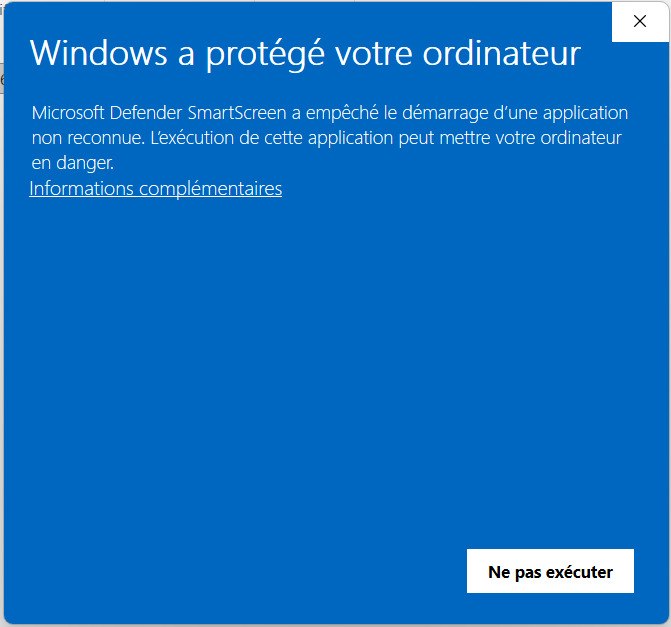
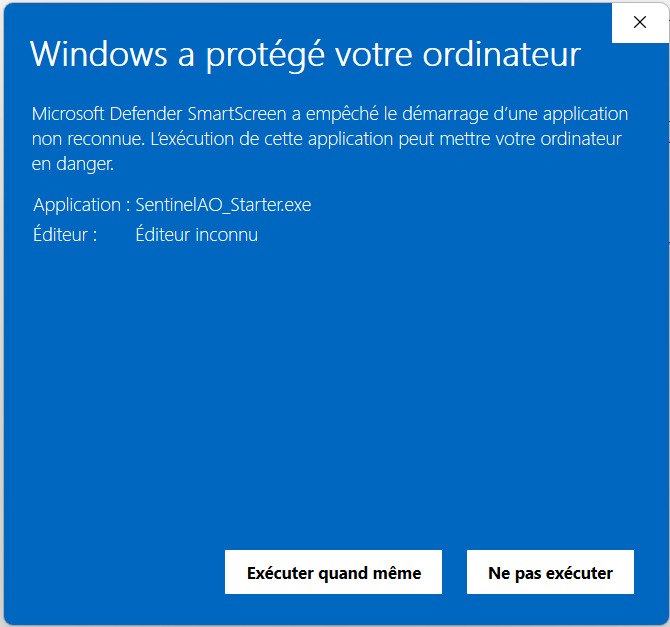
Yes, completely normal: SentinelAO comes from a new publisher not yet “known” to Microsoft. It is perfectly safe — scanned on VirusTotal and flagged clean by all major antivirus engines (Microsoft Defender, Kaspersky, Bitdefender, Avast…). It takes two clicks, once only (Windows remembers afterwards):
Alternative that skips this screen entirely: right-click the .exe file → Properties → tick “Unblock” at the bottom → OK. (Note: the screenshots above show the French Windows interface — the buttons are in the same place in every language.)
No. SentinelAO has been scanned on VirusTotal and flagged clean by all major antivirus engines (Microsoft Defender, Kaspersky, Bitdefender, Avast, ESET…). Some smaller antivirus products are cautious with recent, low-distribution applications (a common false positive). You can safely add an exception for SentinelAO. If in doubt, write to us at contact@sentinelao.fr.
Make sure you unzipped the ZIP first before launching the .exe (do not run it from inside the ZIP file), and that you are on 64-bit Windows. If the problem persists, write to us with a screenshot of the message.
🔑 License & activation
It is emailed to you right after purchase (sender noreply@customers.gumroad.com — remember to check your spam folder) and also appears on your Gumroad receipt page. If you find nothing after 15 minutes, contact us at contact@sentinelao.fr with your order confirmation.
On first launch, paste your key into the activation window (no leading or trailing spaces — the key is case-sensitive). The application verifies the key once, then works normally afterwards.
Starter and Pro AI activate on 2 computers, Agency on 3 computers. Handy for a desktop plus a laptop, or a small team.
Write to us at contact@sentinelao.fr with your key, mentioning that you are changing machines. We reset your activations within 24–48 business hours so you can reinstall on your new computer. To take your keywords with you, see How do I get my keywords on another computer?
For the initial activation, yes. Afterwards, the application periodically re-checks your license but keeps working offline between checks. A connection is still needed to sync new notices.
↻ Updates
Since version 1.2.16, SentinelAO tells you itself: a gold banner appears at the top of the window. You can also check at any time with ❓ Help → 🔄 Updates. Click Download: the zip lands in your Downloads folder. Older versions: re-download the latest version from your Gumroad library.
Then: quit SentinelAO (right-click its icon near the clock → Quit), unzip the file wherever you like and launch the new SentinelAO. You can delete the old .exe. Nothing to uninstall: your configuration and history (the .sentinelao folder) are preserved. The Desktop and Start menu shortcuts, as well as starting with Windows, automatically point to the new file.
Yes, all updates are included in your subscription, at no extra cost: fixes, interface improvements, new features and above all the maintenance of the official source connectors (BOAMP, TED/OJEU, DECP) whenever those sources change their formats. You get each new version from your Gumroad purchase page — nothing to uninstall, your configuration and history are preserved.
The application works normally until the end of the period you have already paid for, then pauses. Your data does not move: the database is stored locally on your computer, nothing is hosted on our side. If you resubscribe, you get your history, keywords and application tracking back exactly where you left them.
💻 Everyday use
Enter the terms related to your business — in French, since the monitored sources publish in French (e.g. « peinture », « ravalement », « menuiserie »). The more precise and varied your keywords, the more relevant the monitoring. With Pro AI, the AI can help generate them from your website address.
The level does not change what SentinelAO searches for: all your keywords (except “Exclude”) are queried on BOAMP, TED and DECP. It changes the relevance score (0 to 100) of each tender, and therefore the order of the list and what triggers an alert (threshold 40 by default).
Essential — a word that, on its own, means “this is for us” (e.g. « analyseur de gaz », « chromatographe »). A single Essential word found gives about 59/100: the tender passes the threshold. Important — a real signal, but one that needs another word to be sure (e.g. « étalonnage », « qualité de l'air »). Alone: ~28/100, below the threshold; two together: ~49/100. Since version 1.2.12, the list shows how many tenders between 25 and 39 are hidden by the filter, with a link to show them. Context — a general word that supports without being enough (e.g. « maintenance », « laboratoire »). Alone: ~11/100. Exclude — a word that signals a false positive (e.g. « médical » if you don't do medical). It sharply reduces the score (×0.4 per word found).
Set everything to Essential? You can, but we advise against it: every word then becomes enough on its own, and a common word such as « maintenance » will push up — and trigger alerts for — dozens of unrelated tenders. You also lose the ranking: a tender naming your exact trade no longer stands out from one containing a vague word. A good rule: “if I read this word alone in a title, would I bid?” Yes → Essential; probably → Important; it depends → Context.
To change a level: on the Keywords page, click the badge in the Level column next to the word and pick the new level (you can also paste a list as word | level, e.g. analyseur de gaz | essential). The “📊 Performance” button flags “noisy” keywords (often matched, rarely kept): they are the first to move down a level.
SentinelAO automatically matches plurals, accents, hyphens and small linking words: « analyseur de gaz » also finds « Analyseurs des gaz ». However, it looks for whole words: « climatisation » does not find « climatiseur », nor does « chromatographe » find « chromatographie ». Two solutions:
1. Add the variants as separate keywords: climatisation, climatiseur, clim. 2. The * wildcard at the end of a word (from version 1.2.12): climati* finds climatisation, climatiseur, climatique; chromatograph* finds both forms. It also works inside a phrase (analyseur* de gaz) and is applied directly in the BOAMP and TED searches.
The stem must be at least 4 letters long: gaz* is refused, it would bring back gazon, gazole, gazette… Pick a stem that only describes your trade: climati* yes, clim* no (climat, climatologie).
From version 1.2.18, in two clicks. On the old computer, on the Keywords page, click “⬇ Export” (bottom right): SentinelAO saves your keywords and their levels to a text file (in Documents). Copy this file to the new computer (USB stick, email…), then click “⬆ Import” on the same page. The keywords are added to the ones already there, nothing is removed, and monitoring starts right away.
The file opens in Notepad (one “keyword | level” line each): you can also use it as a backup, or share it with a colleague. In the Agency edition, export and import apply to the client profile currently displayed.
From version 1.2.20, it's automatic. When you click “📋 Paste a list” (or “⬆ Import”), new keywords arrive marked 🆕, at the top of the list, and SentinelAO shows only them (“🆕 To sort” button). Choose their level one by one: each sorted keyword leaves the selection. To keep a keyword at the level chosen when pasting, click the green ✓ at the end of its row (version 1.2.21). The counter goes down to zero: “Sorting finished ✔”. The “✓ Finish sorting (all)” button keeps all remaining keywords at their level at once; it asks for confirmation, and “Cancel” marks them 🆕 again.
Keywords you already had keep their level, and variants of an existing keyword (plural, accents: “sensors” for “sensor”) don't create duplicates. To set a level in the list, write “keyword | Essentiel” on the line. Keywords to sort are monitored as soon as they are added.
Yes: a keyword of several words is searched as a phrase. Plurals, accents and small words (of, the…) are ignored. However, the words must be in the same order and next to each other.
Hence the rule: 2 or 3 words per phrase. “CO2 sensor” as Essentiel is precise and effective; “wireless outdoor CO2 sensor unit” will almost never match, because a buyer will word it differently. Add single words as Contexte (“co2”, “air quality”) to refine the score.
The red cross ✕removes the keyword: it's no longer used to search, but it doesn't rule out any tender. Useful for a word that is too general (“gas”): notices containing it are still found by your other keywords. A “Cancel” bar lets you get it back right away, with its level.
The “Exclude” level does the opposite: a tender containing this word gets a much lower score (e.g. “chair” if you don't sell furniture). Use it when a word signals a false positive, not when it's merely useless.
Since version 1.2.21, the tender leaves the list and the next one opens, so you can sort in one go. A “Cancel” bar lets you undo. To find your ignored tenders, choose the “Ignored” filter; the “↺ Stop ignoring” button puts a tender back in the list.
Ignoring never changes a keyword by itself. The signal helps spot keywords that are too broad: Keywords page → 📊 Performance, a keyword that finds many tenders you ignore is flagged ⚠, and you decide whether to remove it or set it to “Exclude”.
Settings are saved with the “Save” button. From version 1.2.20, an “⚠ Unsaved changes” bar appears at the bottom of the window as soon as you change a setting, and if you leave the page or close the window without saving, SentinelAO asks: Save / Don't save / Cancel. With an older version, scroll to the bottom of the Settings page and click “Save” before leaving.
Automatically: SentinelAO syncs at startup, then at a regular interval (every 4 hours by default, adjustable in Settings → Sync, including “manual only”). The “Sync” button is available at any time for an immediate refresh. A status indicator is shown in the status bar at the bottom of the interface.
The simplest way: in Settings → Email alerts, choose “Via SentinelAO”, type the address where you want to receive the alerts, then click “Send a test email”. That's it. If you want the alerts to come from your own address, choose “From my own mailbox” — SentinelAO fills in the server and port from your address. With Gmail, four steps, done once: turn on 2-Step Verification for your Google account, create an app password (a 16-letter code — Google deliberately refuses your regular password when software does the sending), fill in Settings → Email alerts (server smtp.gmail.com, port 587, username = your full Gmail address, password = the 16-letter code), then click “Send a test email” and tick “Enable”. The whole setup is shown in this video (1 min 53):
No. Closing the window does not stop the monitoring: SentinelAO minimizes to the clock area (Windows notification area) and keeps syncing and sending email alerts. A notification even flags newly detected tenders. To quit completely: right-click the icon near the clock → Quit. You can also tick “Launch SentinelAO at Windows startup” in Settings → Sync so monitoring starts with your session, without opening a window. The one honest limitation: everything runs on your PC (no server, your data stays with you), so monitoring only runs while your computer is on.
Check your internet connection. If it is active, the BOAMP or TED servers may be temporarily unavailable — try again in a few minutes. SentinelAO shows the status of each source in the status bar.
On the Tenders page, leave the “Departments” field empty and press Enter: no geographic filter is applied. The scope is then set by Settings → Geographic scope: “France only (mainland + overseas)” or “France + Europe” (public buyers from other European countries, via TED).
Good to know: if you had clicked “Save this targeting” with departments filled in, the BOAMP sync only fetches those departments. Clear the field, click “Save this targeting” again, then run a sync. Also, European notices usually carry no department code: as soon as you filter by department, they no longer appear in the list.
SentinelAO covers the three official national and European sources (BOAMP, TED, DECP). Some regional platforms with dynamic display cannot be accessed automatically — but a large share of their awarded contracts already surfaces through the national DECP.
🤖 Pro AI
Pro AI uses an AI engine to analyze notices, with your own key (DeepSeek, OpenAI, Anthropic, Mistral, or Ollama locally and free). You stay in control, and we take no cut of your usage.
Very little. With DeepSeek (recommended), expect around €2 per year for normal usage (you track your consumption on the provider's website). If your key expires or runs out of credit, the application tells you with a message, and keyword scoring keeps working.
No. The onboarding on first launch guides you step by step: you create your API key (a few minutes), paste it into Settings → AI Filtering, and you're off.
🔑 Where to get an API key
Pro AI works with your own key from one of these providers.
Create an account, generate a key, then paste it into
Settings → AI Filtering in the application.
DeepSeek is recommended: analyzing one tender costs roughly
€0.0003 (over 3,000 analyses per euro), i.e. about
€2 per year in normal use — a small credit top-up, not a
subscription. Ollama runs locally, free, with no key at all.
The step-by-step video (2 min 03) — create your DeepSeek
account, add a $2 credit, generate the key and paste it into SentinelAO:
You create one profile per client, each with its own keywords and its own filtered list, and switch between them in one click.
Yes. You add your logo and colors, and your client's name appears in the header. The SentinelAO name does not appear on branded reports.
They are emailed at the frequency you choose, via the Windows Task Scheduler (no external server), while your computer is on. If the PC is off at the scheduled time, the report is sent at the next startup.
Problem not solved?
Our support team replies within 24–48 business hours. Attach a screenshot or the exact error message for a faster resolution.